---
title: How To Set-Up And Assign Routine And Onboarding Task
description: "Productivity\nTask\nAssignments"
---
[Skip to content](https://support.paidhr.com/how-to-set-up-and-assign-routine-and-onboarding-task#main-content)
English
Show submenu for translations

- Home
- Products
- Pricing
- Blog
- Company
Open main navigation
Close main navigation
- Home
- Products
- Pricing
- Blog
- Company
- English
Show submenu for translations
- Contact us
Contact us
How can we help you?
- There are no suggestions because the search field is empty.
1. [PaidHR Help Centre](https://support.paidhr.com/)
2. [Tasks](https://support.paidhr.com/tasks)
# How To Set-Up And Assign Routine And Onboarding Task
## The Task Management feature allows administrators to assign tasks to employees across the organization. Tasks can be assigned to an individual employee, multiple employees, or an entire department.
How to Assign a Routine Task
1. Log in to your Admin account.
2. Scroll down and click **Tasks**.
3. Click **Create New Routine Task**.
4. Complete the required fields:
- **Task Title** – Enter a title for the task.
- **Task Owner** – Select the employee responsible for overseeing the task.
- **Allow Others to Update Task** – Select **Yes** or **No** to indicate whether employees other than the task owner can update the task.
- **Date Range** – Select the task start date and end date.
- **Details** – Enter a description or any additional information related to the task.
- **Assign Employees** – Select the employee(s) or department to whom the task will be assigned.
5. Click **Create** to save and assign the task.
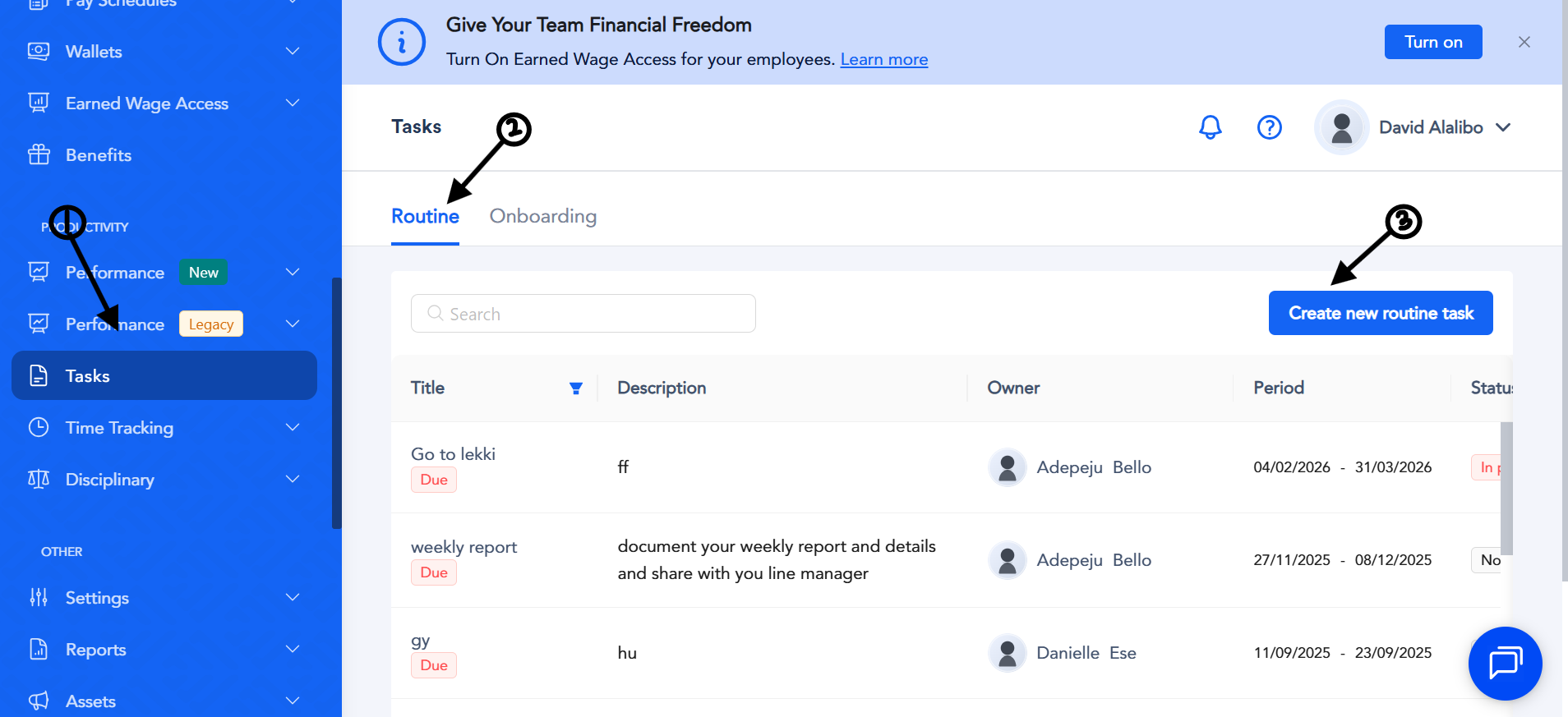
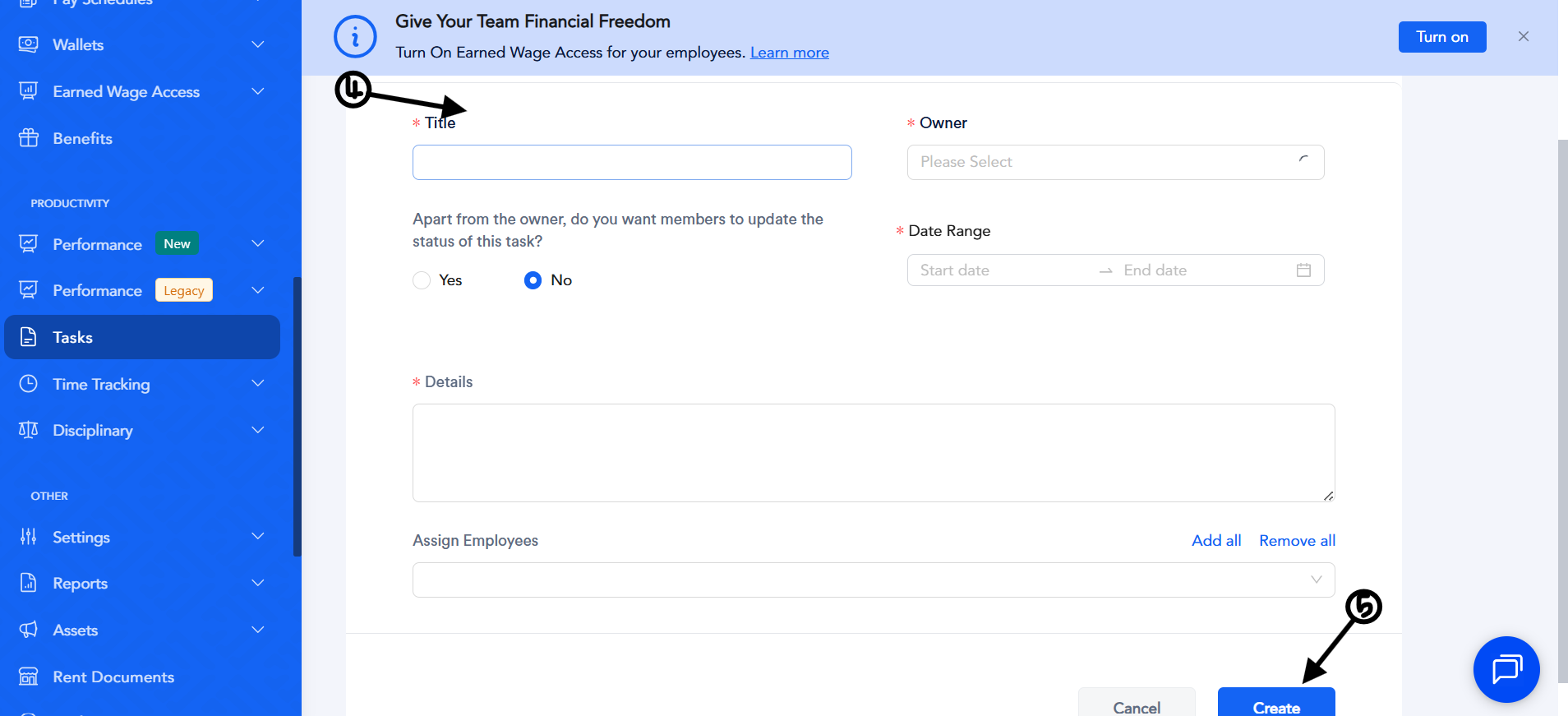
The assigned employees will be notified and can view the task from their account dashboard.
How to Assign an Onboarding Task
1. Log in to your Admin account.
2. Scroll down and click **Tasks**.
3. Click **Onboarding** beside **Routine**.
4. Click **Create Onboarding Task**.
5. Complete the required field:
- **Description** – Enter the details of the onboarding task.
6. Click **Create** to save the task.
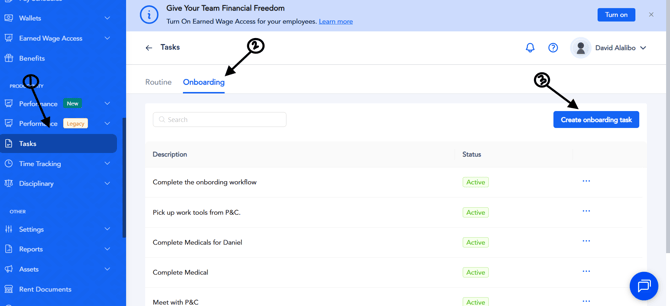
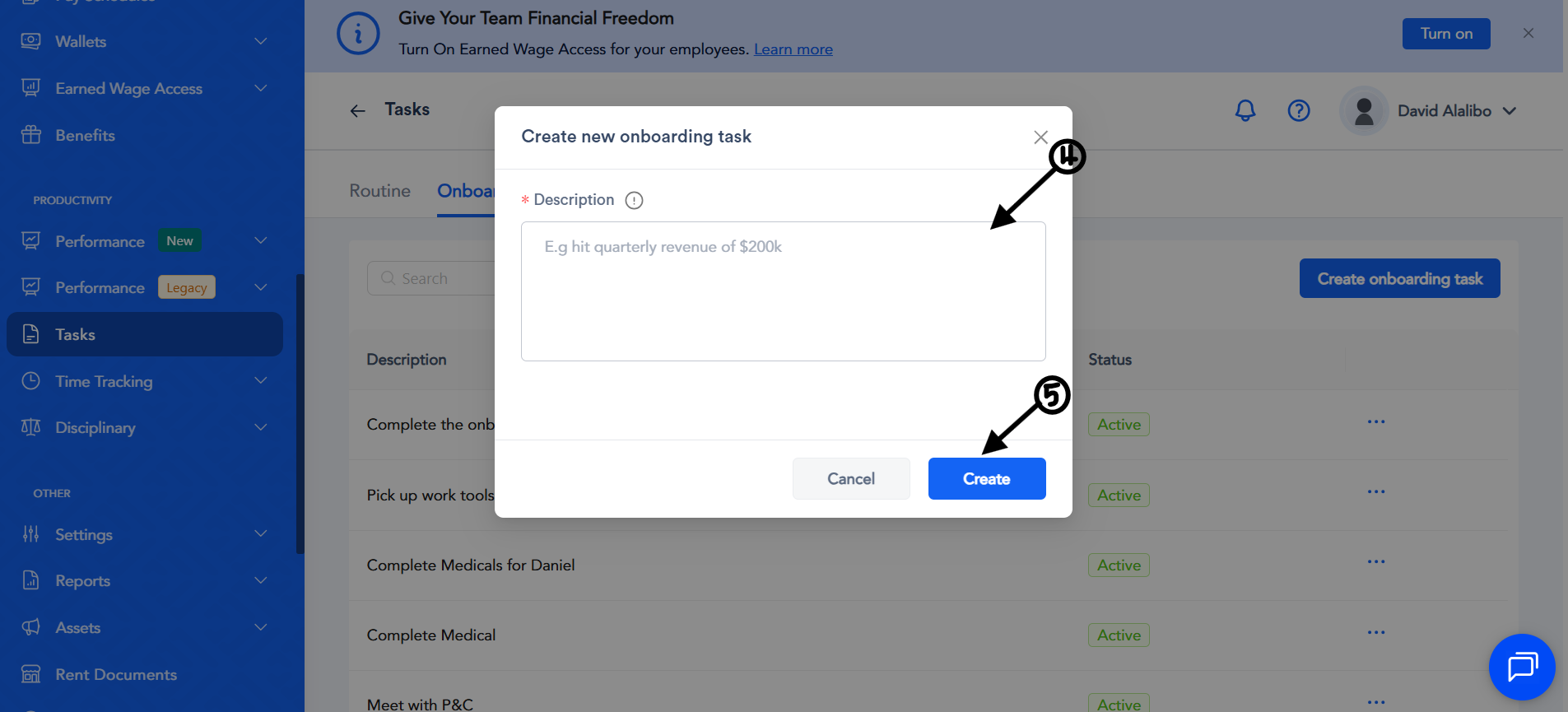
The onboarding task will be added to the onboarding workflow and can be assigned to new employees as part of their onboarding process.
- [Getting started](https://support.paidhr.com/getting-started)
- [Admins: Start Here](https://support.paidhr.com/admins-start-here)
- [Employees: Start Here](https://support.paidhr.com/employees-start-here)
- [Payroll](https://support.paidhr.com/payroll)
- [Payroll Management](https://support.paidhr.com/payroll-management#main-content)
- [Payroll Changes](https://support.paidhr.com/payroll-management#payroll-changes)
- [Allowances](https://support.paidhr.com/payroll-management#allowances)
- [Statutory Remittance](https://support.paidhr.com/payroll-management#statutory-remittance)
- [Amend Payroll](https://support.paidhr.com/payroll-management#amend-payroll)
- [Cross-Border Payments](https://support.paidhr.com/cross-border-payments)
- [Earned Wage Access (EWA)](https://support.paidhr.com/earned-wage-access-ewa)
- [Loan Marketplace](https://support.paidhr.com/loan-marketplace)
- [Settings](https://support.paidhr.com/settings#main-content)
- [Confirmation](https://support.paidhr.com/settings#confirmation)
- [People](https://support.paidhr.com/people#main-content)
- [Onboarding](https://support.paidhr.com/people#onboarding)
- [Leave](https://support.paidhr.com/people#leave)
- [Exit](https://support.paidhr.com/people#exit)
- [Cantractor](https://support.paidhr.com/people#cantractor)
- [HRIS](https://support.paidhr.com/people#hris)
- [Request](https://support.paidhr.com/request#main-content)
- [Leave](https://support.paidhr.com/request#leave)
- [Exit](https://support.paidhr.com/request#exit)
- [Loan](https://support.paidhr.com/request#loan)
- [Performance Management](https://support.paidhr.com/performance-management#main-content)
- [Setting Up Performance Module](https://support.paidhr.com/performance-management#setting-up-performance-module)
- [Company Gaols](https://support.paidhr.com/performance-management#company-gaols)
- [Departmental Objectives](https://support.paidhr.com/performance-management#departmental-objectives)
- [Key Result](https://support.paidhr.com/performance-management#key-result)
- [Review](https://support.paidhr.com/performance-management#review)
- [Questionnaires](https://support.paidhr.com/performance-management#questionnaires)
- [Performance Management Glossary](https://support.paidhr.com/performance-management#performance-management-glossary)
- [Reports](https://support.paidhr.com/reports)
- [Benefits](https://support.paidhr.com/benefits)
- [Documents](https://support.paidhr.com/documents)
- [Assets](https://support.paidhr.com/assets)
- [Wallet](https://support.paidhr.com/wallet)
- [Time Tracking](https://support.paidhr.com/time-tracking)
- [Payslip](https://support.paidhr.com/payslip)
- [PaidHiring](https://support.paidhr.com/paidhiring)
- [Employee Wallet](https://support.paidhr.com/employee-wallet)
- [Disciplinary](https://support.paidhr.com/disciplinary)
- [Tasks](https://support.paidhr.com/tasks)
- [Loan](https://support.paidhr.com/loan)
- [Survey](https://support.paidhr.com/survey)
- [Salary Advance](https://support.paidhr.com/salary-advance)
- [Time & Attendance](https://support.paidhr.com/time-attendance#main-content)
- [Setting up Time & Attendance](https://support.paidhr.com/time-attendance#setting-up-time-attendance)
- Home
- Products
- Pricing
- Blog
- Company
[](http://paidhr.com)
**PaidHR Help Center**
[mailto:support@paidhr.com](mailto:support@paidhr.com)
Copyright © 2026, PaidHR