---
title: How to Stop a Recurring Payroll Change
description: This step stops the recurring payroll change from being added to future payrolls.
---
[Skip to content](https://support.paidhr.com/how-to-stop-a-recurring-payroll-change#main-content)
English
Show submenu for translations

- Home
- Products
- Pricing
- Blog
- Company
Open main navigation
Close main navigation
- Home
- Products
- Pricing
- Blog
- Company
- English
Show submenu for translations
- Contact us
Contact us
How can we help you?
- There are no suggestions because the search field is empty.
1. [PaidHR Help Centre](https://support.paidhr.com/)
2. [Payroll Management](https://support.paidhr.com/payroll-management)
3. [Payroll Changes](https://support.paidhr.com/payroll-management#payroll-changes)
# How to Stop a Recurring Payroll Change
## This stops the recurring payroll change from being added to future payrolls.
### When a payroll change such as a reimbursement has been set up as Recurring and you no longer want it to continue being added to future payrolls, you can stop the recurring addition.
### Steps
1. Go to **Payroll → Changes**.
2. Locate the recurring payroll change you want to stop.
3. Open the payroll change to view its details.
4. Confirm that the **Frequency** is shown as **Recurring** and that the status is **Active**.
5. Select **Stop addition for now** at the bottom of the payroll change details.
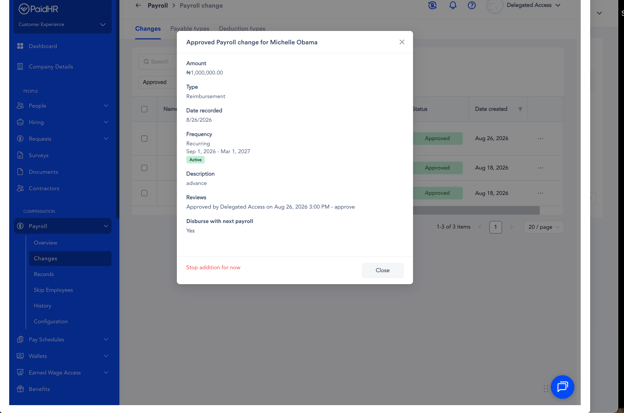
6. Confirm the action if prompted.
This stops the recurring payroll change from being added to future payrolls.
- [Getting started](https://support.paidhr.com/getting-started)
- [Admins: Start Here](https://support.paidhr.com/admins-start-here)
- [Employees: Start Here](https://support.paidhr.com/employees-start-here)
- [Payroll](https://support.paidhr.com/payroll)
- [Payroll Management](https://support.paidhr.com/payroll-management#main-content)
- [Payroll Changes](https://support.paidhr.com/payroll-management#payroll-changes)
- [Allowances](https://support.paidhr.com/payroll-management#allowances)
- [Statutory Remittance](https://support.paidhr.com/payroll-management#statutory-remittance)
- [Amend Payroll](https://support.paidhr.com/payroll-management#amend-payroll)
- [Cross-Border Payments](https://support.paidhr.com/cross-border-payments)
- [Earned Wage Access (EWA)](https://support.paidhr.com/earned-wage-access-ewa)
- [Loan Marketplace](https://support.paidhr.com/loan-marketplace)
- [Settings](https://support.paidhr.com/settings#main-content)
- [Confirmation](https://support.paidhr.com/settings#confirmation)
- [People](https://support.paidhr.com/people#main-content)
- [Onboarding](https://support.paidhr.com/people#onboarding)
- [Leave](https://support.paidhr.com/people#leave)
- [Exit](https://support.paidhr.com/people#exit)
- [Cantractor](https://support.paidhr.com/people#cantractor)
- [HRIS](https://support.paidhr.com/people#hris)
- [Request](https://support.paidhr.com/request#main-content)
- [Leave](https://support.paidhr.com/request#leave)
- [Exit](https://support.paidhr.com/request#exit)
- [Loan](https://support.paidhr.com/request#loan)
- [Performance Management](https://support.paidhr.com/performance-management#main-content)
- [Setting Up Performance Module](https://support.paidhr.com/performance-management#setting-up-performance-module)
- [Company Gaols](https://support.paidhr.com/performance-management#company-gaols)
- [Departmental Objectives](https://support.paidhr.com/performance-management#departmental-objectives)
- [Key Result](https://support.paidhr.com/performance-management#key-result)
- [Review](https://support.paidhr.com/performance-management#review)
- [Questionnaires](https://support.paidhr.com/performance-management#questionnaires)
- [Performance Management Glossary](https://support.paidhr.com/performance-management#performance-management-glossary)
- [Reports](https://support.paidhr.com/reports)
- [Benefits](https://support.paidhr.com/benefits)
- [Documents](https://support.paidhr.com/documents)
- [Assets](https://support.paidhr.com/assets)
- [Wallet](https://support.paidhr.com/wallet)
- [Time Tracking](https://support.paidhr.com/time-tracking)
- [Payslip](https://support.paidhr.com/payslip)
- [PaidHiring](https://support.paidhr.com/paidhiring)
- [Employee Wallet](https://support.paidhr.com/employee-wallet)
- [Disciplinary](https://support.paidhr.com/disciplinary)
- [Tasks](https://support.paidhr.com/tasks)
- [Loan](https://support.paidhr.com/loan)
- [Survey](https://support.paidhr.com/survey)
- [Salary Advance](https://support.paidhr.com/salary-advance)
- [Time & Attendance](https://support.paidhr.com/time-attendance#main-content)
- [Setting up Time & Attendance](https://support.paidhr.com/time-attendance#setting-up-time-attendance)
- Home
- Products
- Pricing
- Blog
- Company
[](http://paidhr.com)
**PaidHR Help Center**
[mailto:support@paidhr.com](mailto:support@paidhr.com)
Copyright © 2026, PaidHR