
After setting up your
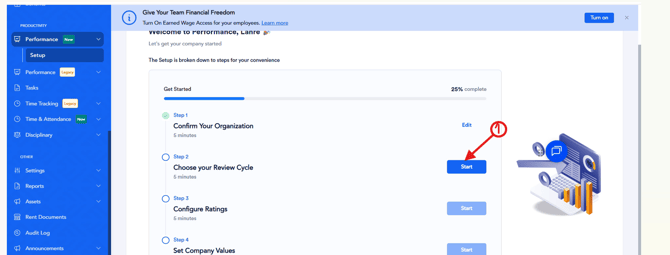
1. Click Start beside Choose Your Review Cycle.
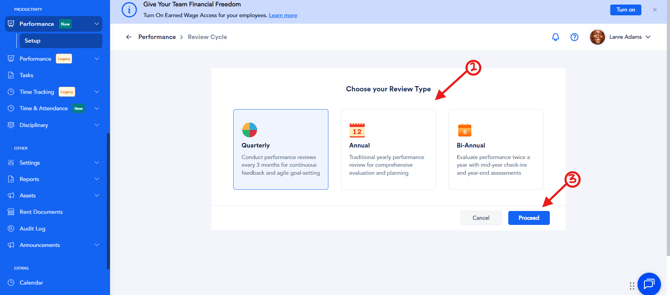
2. Select a Review Type: Choose one of the available review frequencies:
- Quarterly
- Bi-annually
- Annually
3. Click Proceed.
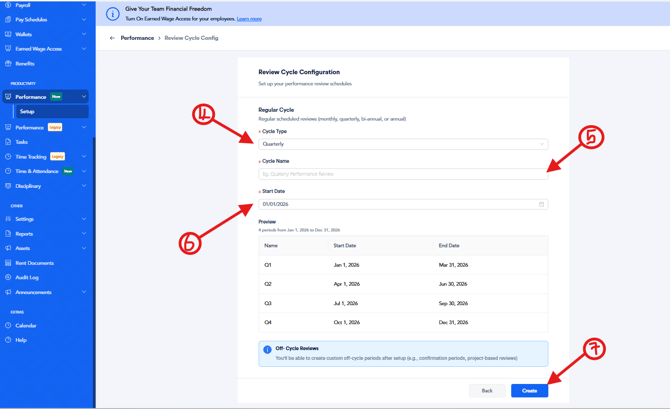
4. Configure Your Review Cycle: Complete the following fields:
- Cycle Type: Select your preferred review frequency.
- Cycle Name: Enter a name for the review cycle.
- Start Date: Choose the date the review cycle should begin.
Based on your selected review frequency, the system automatically calculates and prorates the review period.
5. Click Create to save your review cycle.
The next step is to configure your settings